Free Standard Lease Template
Word & PDF download
The standard Israeli template for unprotected residential tenancy, up to 3 pages, based on the Tel Aviv municipality contract and updated for 2026. Download now, no email and no signup.
Based on Tel Aviv-Yafo Municipality's recommended lease contract · Electronic Signature Law, 5761-2001
Before you download
Unprotected tenancy, that's exactly what this contract is
Almost every residential lease signed in Israel today is an unprotected tenancy, and that's what this template covers. Here's what matters before you fill it in.
What "unprotected" means
A tenancy the 1950s Tenant Protection laws don't apply to. The tenant occupies the apartment for the contract term only, with no right to stay on afterwards and no key money. Every ordinary lease signed today is one of these.
Why this is the standard contract
Protected tenancies have barely been created since 1971. So the standard Israeli lease contract, the one lawyers and the Tel Aviv municipality draft, is an unprotected-tenancy contract, exactly like this template.
The clause you must not drop
The "non-application of tenant protection laws" clause is what stops a tenant claiming protected status. It's in the template, so make sure it stays in even if you edit the document.
A sample lease contract, here's how it looks
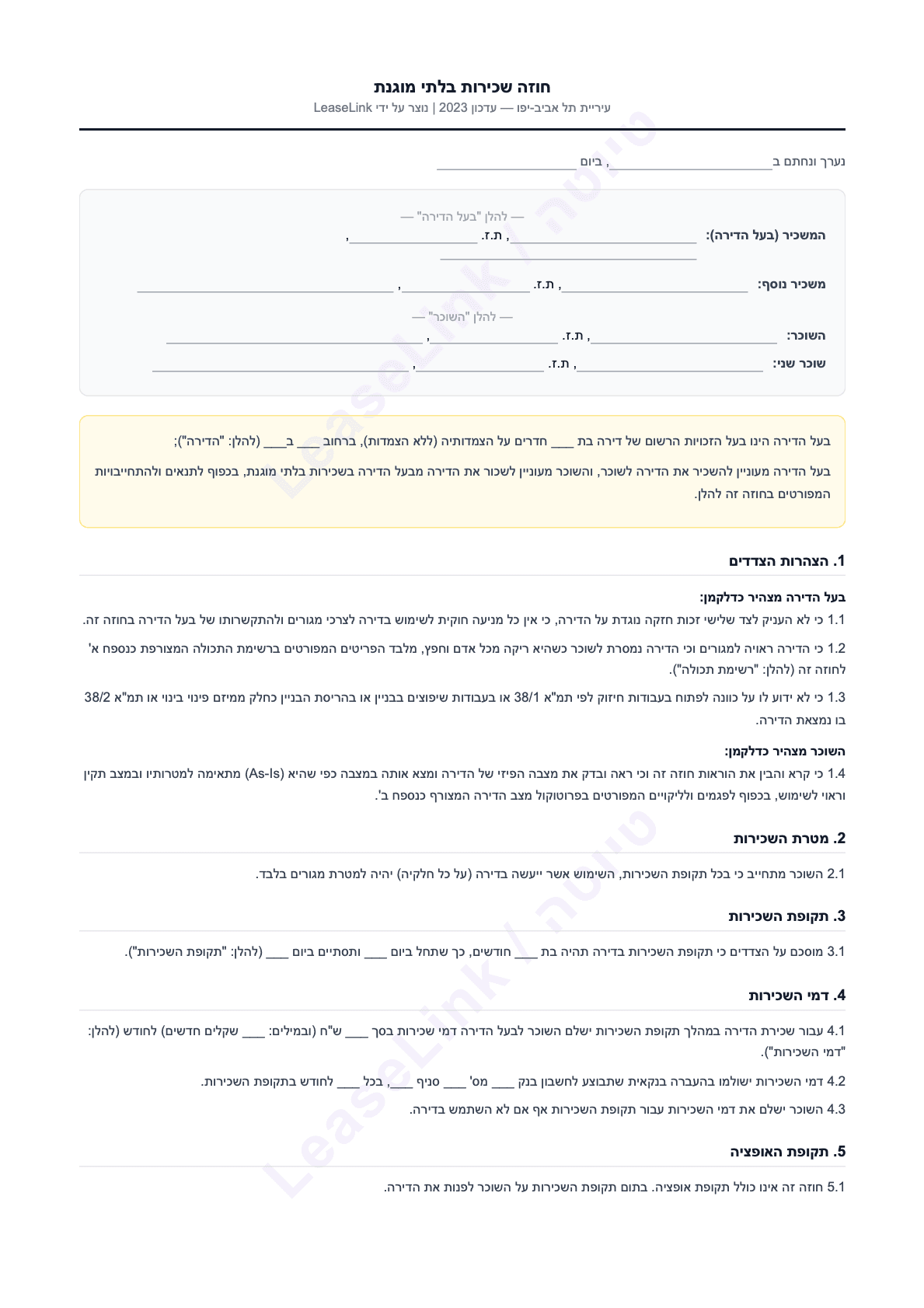
Want to see an example before downloading? The template itself is a standard sample lease contract: 14 clauses, up to 3 pages, including a signature page for landlord, tenant and guarantors.
View the sample contract (PDF)Not suitable for a shop or business, for protected tenancy with key money, or for a complex sublet. In those cases a lawyer is the right call.
And what happens after you fill it in? You sign digitally.
Upload the contract you filled in, the AI automatically marks where each party signs, the tenant verifies with an SMS code, and you have a signature with full legal validity under the Electronic Signature Law, with no printing.
See how it works →Tired of editing the same Word doc every time?
A static template is fine for one apartment. But our AI gives you three things a static template simply can't, across every property, in 3 minutes.
Clauses always up to date with 2026 law
AI bakes the latest fair-rent, deposit and repair-liability clauses into every contract. You don't have to read 200 pages of legislation.
One-click digital signature
Your tenant signs from their phone in 2 minutes. IP, location and timestamp logged, with full legal weight under the Electronic Signature Law, 5761-2001.
A tailored contract per property
Fill in each apartment's details in the wizard in a few short steps and get a contract specific to it, with no copy-paste, no typos and no extra hour of work
Free · start with no signup · no credit card
See for yourself · 30 seconds
This is how you create a personalized rental contract
Instead of manually filling every section in Word, you fill in the property details in the wizard and the system drafts a tailored contract for you. Watch the entire flow, from start to signature
Free · start with no signup · no credit card
Quick guide
How do I fill the template in Word?
Three short steps and you're ready to print and sign.
- 1
Download the Word file
Click the "Download Word" button at the top. The file opens directly in Microsoft Word, Google Docs or Pages.
- 2
Fill in the missing fields
Add landlord and tenant names, property details, monthly rent, lease term and deposits. Every blank field is marked in the file.
- 3
Review the clauses and adapt to your property
Every property is different, so read all 15 clauses and tweak as needed. Add pet, smoking or appendix clauses if relevant. Want to skip this? Our AI does it automatically.
After filling
How do you sign the contract?
Filled the template? Great. Now you need to sign in a way that's legally valid.
- 1
Print 2 identical copies
One copy stays with you, the other with the tenant. Make sure the document is complete, every page is there, and any appendices are printed too.
- 2
Meet in person and sign
Both sides sign every page: full name, ID number, signature and date. The signature page has spots for landlord, tenant, and a second tenant or co-owner if relevant.
- 3
Keep a copy and scan a backup
Each side keeps their signed copy. Scan the contract and store a backup in the cloud. If the paper is lost, you have no contract. With digital signing it's all saved automatically.
What's inside
What does the template cover?
A basic 3-page template with all the mandatory clauses, fully drafted in Hebrew per standard Israeli practice.
- 1Party declarations
- 2Purpose of the lease
- 3Lease term
- 4Rent
- 5Taxes & ongoing charges
- 6Repairs & maintenance
- 7Alterations
- 8Building insurance (on the landlord)
- 9Assignment of rights
- 10Return of the apartment
- 11Breach & remedies
- 12Securities
- 13Tenant Protection Law exclusion
- 14General & signatures
Compare
Word, PDF, or the LeaseLink wizard?
Same template, three ways to ship it. Here's how they stack up.
| Criterion | LeaseLink wizard | Word template | PDF template |
|---|---|---|---|
| Time to a finished contract | 3 min | 30–60 min | 20–40 min |
| Up to date with 2026 law | |||
| Remote digital signature | |||
| Legal audit trail | |||
| Edit & update later | Automatic | Manual | |
| Cost | Free | Free | Free |
Frequently asked
What is an unprotected tenancy lease?
It's a lease the Tenant Protection laws, written in the 1950s to protect long-standing key-money tenants, do not apply to. The tenant holds the apartment for the contract term only and must vacate at the end of it. Almost every residential lease signed in Israel today is unprotected, including this template. The clause that anchors it is called "non-application of tenant protection laws", and it's in the template.
Is this the standard contract used in Israel?
Yes. The template is based on the Tel Aviv municipality's recommended lease, the framework widely treated as the standard Israeli rental contract and used by many lawyers. It includes every clause a standard lease needs: party declarations, term, rent, security, repairs, returning the apartment, and non-application of tenant protection laws.
Is the template legal in Israel?
Yes. It aligns with the Rental and Loan Law, 5731-1971, and recent fair-rent updates. It's based on the Tel Aviv municipality contract, the same framework lawyers use. That said, it's a generic template. If your property is unusual (reverse mortgage, sublet, multiple tenants), use our wizard, which adapts the contract automatically.
Is the template right for me?
It's built for private landlords in Israel renting a standard residential apartment (unprotected lease). It's not the right fit for commercial space, complex sublets or protected tenancy. If you rent multiple properties or want remote signing, look at our wizard.
How long does it take to fill out?
Around 30–60 minutes. You'll fill in landlord and tenant details, property info (address, rooms, condition), monthly rent and term, deposits and guarantees, and review every clause. With the LeaseLink wizard the same contract takes 3 minutes, you fill in the details in a few short steps and the contract builds itself
Do I have to sign physically on the downloaded copy?
Yes. After filling the Word template you'll need to print, meet your tenant in person and sign by hand, or exchange scanned signatures. If you build the contract with the LeaseLink wizard, both sides sign digitally from their phones with full legal weight under the Electronic Signature Law, 5761-2001, plus IP, location and timestamp logging.
What if a dispute comes up with the tenant?
The clauses define exactly what happens in non-payment, eviction or property damage. But if the contract was hand-signed only, the tenant can claim the signature is forged. With LeaseLink digital signing you get a professional record of the signing moment (IP, location, device) that holds up in court.
What's the difference between the free template and the digital contract?
The free template is static, the same text for everyone. The digital contract is dynamic: fill in the property details in the wizard and get a contract tailored to your property, with clauses updated to 2026 law, digital signing built in, and a single dashboard for every contract you've made. Negotiation with the tenant happens inside the platform too.
Is it really free? No catch?
Yes, completely. Free download, no signup, no email, no payment. Use the file for as many contracts as you like. And if you want more, a tailored contract with a digital signature is also free with us. Only full protection (promissory note, guarantee letter, contents annex) costs anything, at ₪79 one-time.
Go deeper
More guides that will save you time
The template is just the start. Here are a few deeper guides that will save you time and headaches.
Extending a lease: what to check
Tenancy ending and staying with the same tenant? What to check in the existing contract, and what happens to the securities.
What must be in an Israeli lease contract
The 11 building blocks of a valid lease, the 5 clauses landlords miss, and the ones to leave out.
Digital lease contracts in Israel: the complete 2026 guide
When digital signatures are valid, how to protect yourself legally, and why this is reshaping landlord workflows in Israel.
Tenant rights in Israel 2026
What your tenant is entitled to, what you cannot put in the contract, and how to avoid disputes.
Ready for a smart, signed contract, fast?
Got the template? Great. Now see how much simpler it gets with AI.
Build a contract in 3 minutesFree · start with no signup · no credit card